Back to the knowledge base
Admax Hosting AB · web hosting in Sweden since 1996Published 16 September 2026
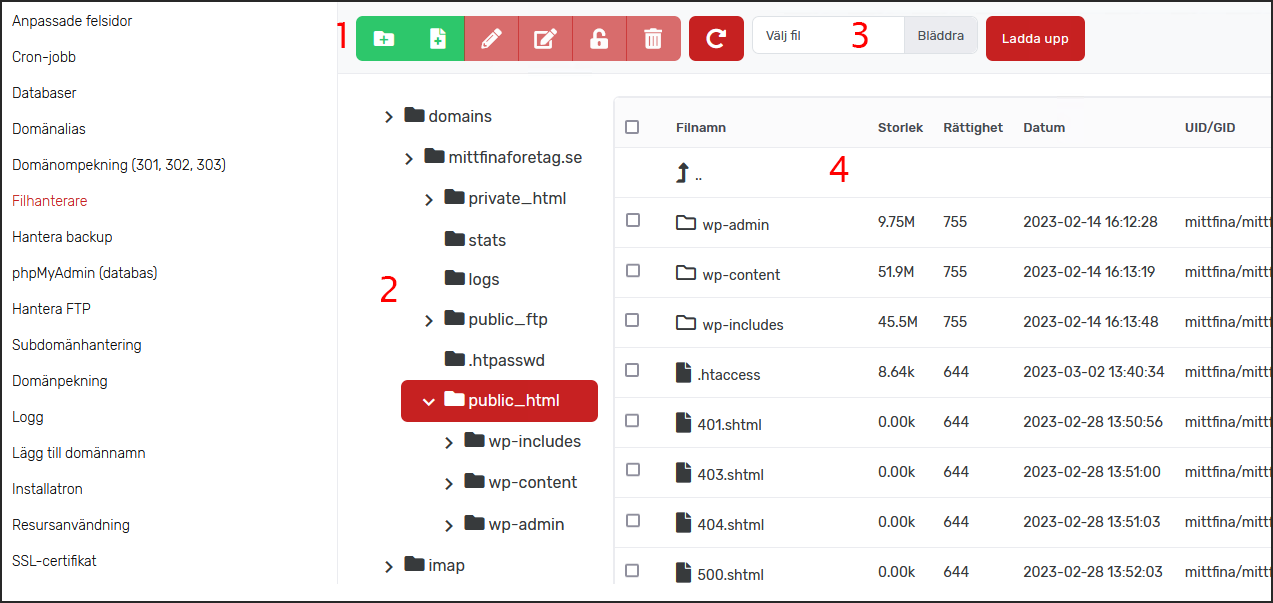
In our file manager you can upload, delete, edit, rename and more. The image below shows an overview of the different sections.
- Use these icons to perform actions on files and directories. From left to right, the icons are:
Create directory
Create file
Edit file
Rename file
Change permissions
Delete
Refresh (section 4) - This is the directory structure. Your website is located in the "public_html" directory, which you can reach by clicking domains > the domain name (mittfinaforetag.se in our example) > public_html
- Here you can upload files to the account from your computer. We recommend moving files via an FTP client such as FileZilla.
- This area shows the contents of the directory you have navigated to in the directory structure. By ticking a file or directory, you can select an action from the icons (1), such as renaming or changing permissions.